
Migration guide
IIS Migration: Rehost vs Rebuild vs Replace
A practical breakdown of the three paths off a legacy IIS server — what each one actually involves, what it costs in time, and how to tell which one fits your site.
Published July 14, 2026 · Last updated July 29, 2026
What each path actually means
"Rehost," "rebuild," and "replace" get used loosely in migration conversations. Here's what each one actually involves once work starts — not the marketing version.
Path 01 — Rehost
Same application, modern infrastructure
Rehosting moves the application and database as-is onto modern infrastructure. No application code changes. The IIS site — classic ASP or ASP.NET, WebForms or MVC — is lifted onto a managed Windows cloud host, typically Azure App Service. The SQL Server database is backed up and restored onto a managed SQL service. Connection strings and app settings are updated to point at the new endpoints, then DNS is cut over.
A regional service company's client portal ran on Windows Server 2012 with an unremarkable ASP.NET WebForms app underneath. The application itself was stable — the problem was entirely the box it ran on. Rehosting it took under two weeks: same code, same login screen, same behavior, just running on modern cloud infrastructure instead of a server closet.
The manufacturing case study on this site is a rehost: a decade-old production scheduling and inventory application moved onto Azure with no application code changes, in a single three-hour maintenance window, with Azure Backup and Site Recovery closing a disaster-recovery gap the on-premises setup never really had.
Best fit: the application logic is sound and the urgency is really about the infrastructure underneath it — an end-of-support server, rising hosting costs, or nobody left who can safely patch it.
Not a fit when: the code itself is the liability — undocumented, insecure at the application layer, or a codebase nobody wants to touch again. Rehosting a bad application just moves the bad application somewhere newer.
Path 02 — Rebuild
Same purpose, current codebase
Rebuilding keeps the site's purpose and data while replacing the application layer with something current. Requirements get distilled from the existing app — often the running application is the only documentation that exists. A new frontend and backend get built on a supported framework, the database schema and data are migrated and validated (not just copied), existing URLs are preserved or redirected, and the old and new systems run in parallel until the switch is approved.
The case study on this site is a rebuild: a direct-response marketing company's ASP.NET platform on Windows Server 2008 was rebuilt on a modern JavaScript frontend with a lightweight API and a PostgreSQL database, in three weeks, with near-zero downtime — the business kept accepting new customer registrations the entire time.
Best fit: business-critical sites where the underlying code has become the actual bottleneck — can't safely add features, nobody understands the codebase anymore, or the security posture is genuinely bad.
Not a fit when: the existing application works fine and the only real problem is where it's hosted. That's a rehost, and rebuilding when a rehost would do is expensive overkill.
Path 03 — Replace
Stop running the software altogether
Replacing is the path where you stop maintaining the application entirely and get the same capability from somewhere else. Nothing is lifted and nothing is rewritten, because the thing causing the problem isn't being carried forward at all. That takes two forms in practice, depending on whether the site is custom-built or off-the-shelf.
Replace → retire. For sites that never really needed a dynamic backend, the whole server stack comes out. Content and structure carry over to plain HTML, CSS, and JavaScript. Contact forms are handled by the hosting platform — Netlify Forms, for instance — instead of a server-side mailer. Any database content is exported and archived rather than migrated live, since there's nothing left to serve it dynamically. The result deploys to static hosting with TLS and a CDN included by the platform. A site that's really a digital brochure — hours, location, a contact form, maybe a downloadable price list — almost never needed IIS, ASP.NET, or a database in the first place, and its ongoing hosting bill drops to nearly nothing.
Replace → swap. When the site runs on off-the-shelf software the vendor has stopped maintaining, the capability is still needed — so it moves to a currently supported product instead of being retired. The transportation and logistics case study on this site works that way: an unsupported internal wiki moved to a current, actively maintained alternative on Azure. Rehosting it would have carried the same unpatched software onto newer infrastructure; rebuilding it would have meant writing custom software to do a job that shipping products already do. Swapping closed the gap at its source.
Best fit: content-only or brochure sites where a full server stack was always more than the job required, or any site whose underlying off-the-shelf platform is no longer supported.
Not a fit when: the application encodes business logic specific to how you operate. Retiring it has nowhere to put that logic, and no off-the-shelf product will match it — that's a rebuild.
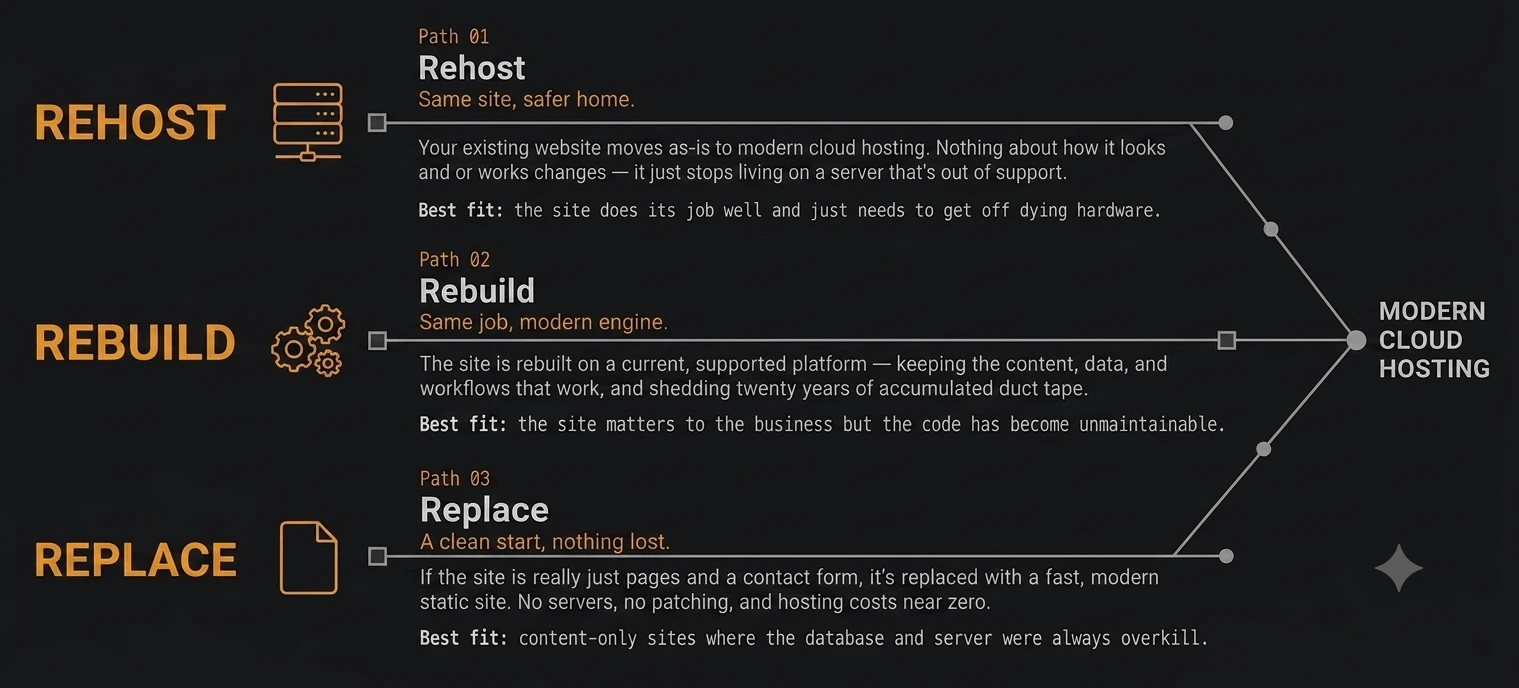
The three paths, side by side
All three roads lead to the same place — a site that no longer depends on infrastructure someone forgot was still running. What differs is how much of the existing application survives the trip.
End-of-support timeline reference
These are the dates that usually start the conversation. "Extended support" ending doesn't mean the server stops working — it means security patches for newly discovered vulnerabilities stop shipping, unless you're paying separately for Extended Security Updates. Sourced directly from Microsoft's own lifecycle documentation:
| Product | Mainstream support ended | Extended support ends |
|---|---|---|
| Windows Server 2012 | October 9, 2018 | October 10, 2023 — source |
| Windows Server 2012 R2 | October 9, 2018 | October 10, 2023 — source |
| Windows Server 2016 | January 11, 2022 | January 12, 2027 — source |
| Windows Server 2019 | January 9, 2024 | January 9, 2029 — source |
| Windows Server 2022 | October 13, 2026 | October 14, 2031 — source |
| SQL Server 2012 | July 11, 2017 | July 12, 2022 — source |
| SQL Server 2014 | July 9, 2019 | July 9, 2024 — source |
| SQL Server 2016 | July 13, 2021 | July 14, 2026 — source |
| SQL Server 2017 | October 11, 2022 | October 12, 2027 — source |
If your server or database is already past its extended-support date, it isn't an emergency by itself — but it does mean the clock on "plan this calmly" has already run out, and what's left is "handle it before something else forces the timeline."
How to decide which path fits
Most of the decision comes down to where the actual problem lives — the server, the code, or neither.
| If your situation is... | The usual fit is... |
|---|---|
| The application works fine, the server underneath it doesn't | Rehost |
| The code is the actual problem — unmaintainable, insecure, or blocking new features | Rebuild |
| It's a brochure site — pages, a contact form, maybe a PDF | Replace → retire |
| It runs on off-the-shelf software the vendor no longer maintains | Replace → swap |
| You're genuinely not sure | Two-minute assessment first, then a free consultation for the fixed price |
If you would rather have this decision made against your own site than read about it in general, the two-minute assessment asks six plain-language questions and names one of these three paths, with its reasoning and the open questions shown. It is free, it asks for no email address, and nothing you enter leaves your browser.
Still want more detail before talking it through? The free IIS migration guide covers this same decision in more depth, plus what to have ready before a consultation call.
Frequently asked questions
How long does an IIS rehost typically take?
Most rehosts run one to three weeks from kickoff to cutover. The timeline is mostly bound by how much cleanup the existing environment needs — undocumented dependencies, custom IIS modules, or unusual database configurations add time. A straightforward ASP.NET app with a single SQL Server database is often the fastest of the three paths, since no application code is being rewritten.
Can I rebuild a classic ASP site without losing data?
Yes — the data and the code are handled separately. The database is migrated, and typically cleaned and validated in the process, independent of what the new application looks like. The old system keeps running untouched throughout, so there's no window where data only exists in a half-migrated state.
What does it cost to migrate off IIS?
It depends on the path and the state of the existing site, which is why every project gets a fixed-price quote after a free consultation rather than a generic number. As a rule of thumb, rehosts are typically the least expensive of the three paths since no application code changes; rebuilds cost more in proportion to how much of the application needs to be reconstructed; replacements are usually the cheapest to run afterward, since there's no server or database to keep paying for.
Do I need to migrate IIS and SQL Server at the same time?
Not necessarily, but it's usually simpler to. If the application and database are tightly coupled — most are — migrating them together avoids running a bridge configuration where a modernized app talks back to an aging on-premises database, which reintroduces the exact reliability and security problems the migration is meant to fix. In some cases, particularly rehosts, it can make sense to stage the database first.
Can I test the new environment before switching over?
Yes, always. The new environment is built and populated in parallel with the existing site, at a private staging address, while the old site keeps running untouched. You review and approve it there. Nothing goes live, and no DNS changes happen, until you sign off.
What happens to my domain and email during migration?
Nothing, unless email is specifically part of the migration scope. DNS is only touched at the final cutover step, and only the records needed to point the website at its new home — mail routing is left alone unless you ask otherwise. If email is hosted on the same aging server, as with on-premises Exchange, that's scoped and discussed separately during the consultation.
40 yrs
Microsoft infrastructure experience
Migration advice from someone who still does this for a living.
- //Microsoft Certified Trainer (MCT) — credentialed to teach other engineers this exact material, not just apply it.
- //Cloud Systems Engineer — manages enterprise Microsoft infrastructure as an actual day job, not only for client projects.
- //In IT since 1986 — has personally deployed, patched, and eventually retired the exact kind of servers being migrated here.
- //Solo, project-based — no account managers, no handoffs. The person who scopes the project is the one who runs it.
Ready to talk through your specific site?
Thirty minutes, free, no obligation — or read the short version first if you're not ready for a call.